# How to Install Mem-App on iPhone, iPad or MacOS
> Source: https://mem-app.com/blogs/install-ios-app (Mem-App blog, 2024-07-30)
Follow these steps to install Mem-App on your iOS device:
1. **Open Safari Browser**: Launch Safari on your iPhone or iPad.
2. **Visit Mem-App Website**: Navigate to [mem-app.com](https://mem-app.com).
3. **Add to Home Screen**: Tap the share icon at the bottom of Safari and select "Add to Home Screen."
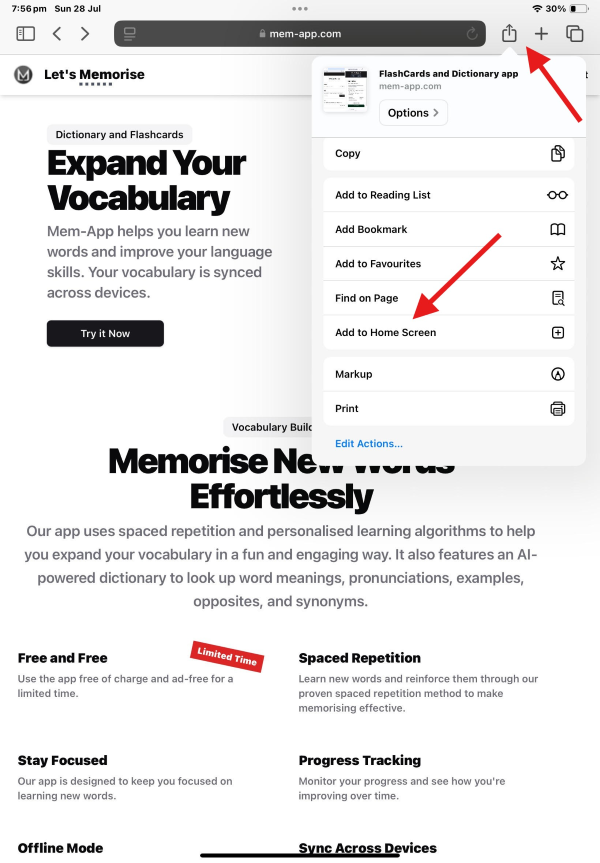
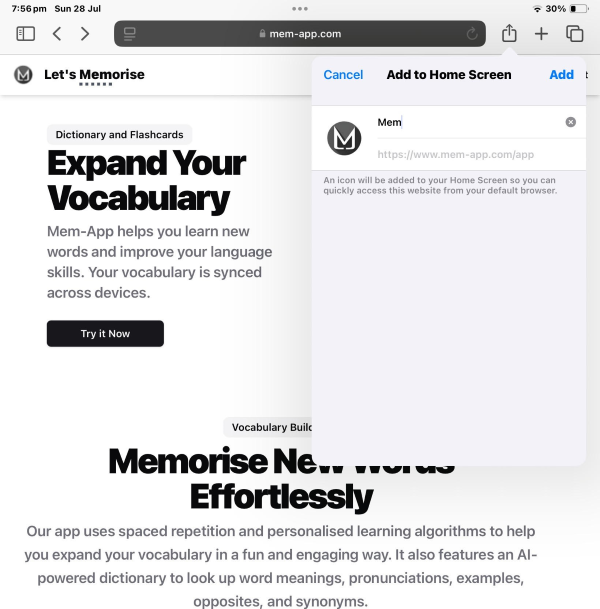 That's it! The Mem-App icon will now be added to your home screen, making it easy to build your vocabulary anytime, anywhere.
## Try it yourself
Starter is free to start: up to 50 words, and no ads.
👉 [Try Mem-App free](https://mem-app.com/app/)
Which theme should I cover next? Tell me in the comments or message me.
---
**Mem-App** · _Let's memorise!_
Install it from your browser: [Android](https://mem-app.com/blogs/install-android-app) · [iPhone, iPad or Mac](https://mem-app.com/blogs/install-ios-app) · [Windows](https://mem-app.com/blogs/install-windows-app)